
How to Share a Digital Business Card: Every Way to Connect
Seven ways to share a digital business card — QR code, NFC tap, plain link, phone wallet, email signature, website widget, and social bio — and how to pick the right one for each moment.
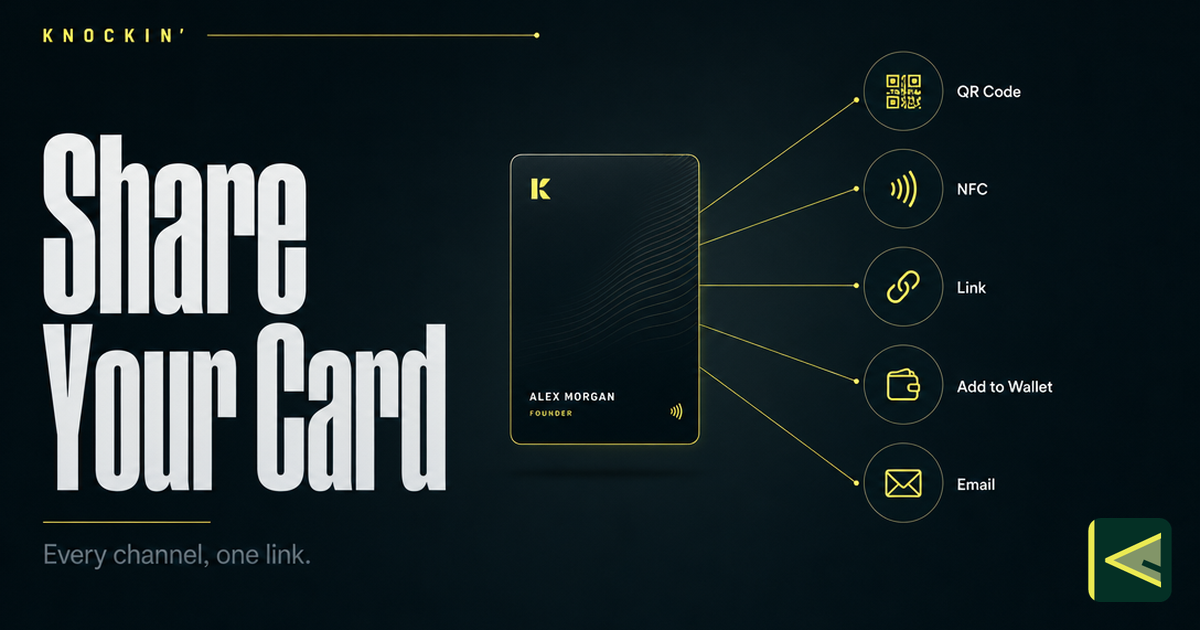
You made a digital business card because it can do things paper never could — update itself after printing, carry your actual work, keep answering questions when you're not in the room. None of that counts for anything until the card reaches another person. That's the question this guide answers in full: how to share a digital business card, through every channel that currently works.
The short version: the best way to share a digital business card is whichever channel meets the other person where they're already standing. Face to face at an event, that's a QR code or an NFC tap. Over email, it's a link — and over years of email, it's your signature. On your own site, it's an embedded widget; on social media, it's the one link in your bio. Underneath all of these runs the same URL. A digital card is one link wearing several outfits, and each outfit owns a different moment.
So here is the whole landscape — seven channels, each covered as how it works, when it's the strongest choice, and what to watch out for — followed by a scenario map for picking in seconds, a look at what happens on the recipient's side, and what you can learn after the share.
One Card, Seven Doors
Before the channels, one piece of mechanics worth internalizing: at the center of every digital business card is a plain URL. QR codes encode it. NFC tags store it. Wallet passes point at it. Email signatures, site widgets, and bio links carry it. When someone "receives your card," what they've really received is a way to open that URL in a browser — no app on their side, no file to save, nothing to get lost in a drawer.
That architecture has two consequences, and both of them change how you think about sharing.
First, you can change the card without touching the channels. Update your role, add a project, rewrite your intro — every QR code already printed on a booth wall, every signature already sitting in a client's inbox, every pass already saved to a phone leads to the current version. With paper, a thousand printed cards are a thousand copies of a decision you can't revise. With a link, a thousand shares are a thousand doors into one room you redecorate at will.
Second, the channels don't compete — they layer. Someone can scan your QR at a conference on Monday, click the same card in your email signature on Thursday, and open it from your website a month later, and it's one continuous introduction, not three disconnected artifacts. If you're new to the format and want the mechanics from the ground up, start with how digital business cards work.
The Complete Channel Landscape
Sharing surfaces have multiplied across card platforms — one established provider now counts more than thirteen distinct ways to share, from QR and text to watch apps and home-screen widgets [Source: https://www.hihello.com/blog/how-to-share-a-digital-business-card-without-an-app]. You don't need all of them. These seven cover essentially every introduction you will ever make.
Share It with a QR Code
The QR code is the workhorse of in-person sharing: the other person points their phone camera at your screen or a printed code, and your card opens. It earns that spot because it scales — one code on a slide, a badge, or a booth wall can serve a hundred scans in an afternoon, and every modern phone reads QR codes with its built-in camera, no app involved. For generating, customizing, and printing yours — including the mistakes to avoid before a print run — see the dedicated guide to digital business card QR codes.
Share It with an NFC Tap
NFC is the closest digital equivalent of handing something over. Hold two phones close together, or let someone tap a physical NFC tag embedded in a card, a badge, or a desk sticker, and their phone opens your link. No camera framing, no typing, no app — the gesture itself is the transfer, and it reads as a small moment of effortlessness in a live conversation.
Reach for NFC when the moment is genuinely one-on-one: the end of a good conversation, a desk that visitors walk up to, a counter at a pop-up or storefront. Two things to watch. Not every phone has NFC switched on — older and entry-level models vary — so keep a QR code as the fallback for the occasional phone that won't cooperate. And physical tags are write-once, read-forever: you write your link to the tag a single time, and it keeps working indefinitely. For tags, compatible phones, and setup, see what an NFC business card actually is.
Send the Link Directly
The plain link is the default channel — the one every other method ultimately delivers. Copy the URL and paste it into a text message, an email, a WhatsApp or Slack or LinkedIn message, and it arrives like any other link: rendered, tappable, openable in any browser on any phone.
It's strongest where the introduction is remote or asynchronous. The follow-up after a call ("here's the card I mentioned"), the warm intro where you connect two people by email, the reply that would otherwise balloon into six paragraphs of background — a link hands over the context and lets the other person absorb it at their own pace. The caveat is presentation. A bare link with no words around it reads as spam; a wall of text reads as homework. Give it one sentence of framing — who you are, why you're sending it, what they'll find. And if you're still sorting the terminology, the difference between a virtual business card and a digital one lives in the details.
Keep It in Your Phone Wallet
Both major phone platforms let you store passes in Apple Wallet or Google Wallet, and a digital business card can live there like a boarding pass — reachable from the lock screen, no app to open, no hunting through icons while someone waits. Card platforms typically expose this as an "Add to Wallet" action in card settings [Source: https://www.hihello.com/blog/sharing-your-hihello-card].
Notice what this channel is for: it's for you, not for them. The wallet pass makes your own card the fastest thing on your phone, which matters at an event when someone asks "do you have a card?" and the answer needs to take two seconds. The person you're sharing with still ends up on your link — the pass just takes you straight there, past every home screen. One nuance worth understanding before you rely on it: what lives in the wallet is a pass pointing at your card, not a second copy of the card. That has implications for updates and for what shows up offline, and we walk through them in digital business cards in Apple Wallet.
Put It in Your Email Signature
Your email signature is the only channel that keeps working while you sleep. Add the card link — or a small, one-line banner — to your signature once, and every message you send for the next year quietly carries your introduction with it. No extra action per email. No remembering to attach anything.
It's the right channel for long relationships and slow threads: the person you emailed in March meets your updated self in September without either of you lifting a finger. The discipline is restraint. One link, one line. A signature stacked with an inspirational quote, three badges, a confidentiality disclaimer, and a headshot buries the one thing worth clicking — and annoys the twenty people who receive your replies. Most mail clients also let you set different signatures for new messages versus replies; put the card in the first and spare the second.
Embed It on Your Website
If you have a personal site, a portfolio, or a landing page, an embeddable widget puts the live card on the page itself — not one click away, on it. Visitors reading your About or Contact page meet the card where they already are, and if the card can converse, they can ask it a question instead of emailing "so what is it you actually do?" and waiting a day for the answer.
This is the highest-intent placement in the entire landscape: someone who reached your site has already decided you're worth a look, so the only task left is not losing them to a wall of prose. Treat the widget as part of the page's design — place it where intent peaks, keep the page fast, and check that it doesn't fight the layout on mobile. Knockin ships an embeddable widget for exactly this use; the thinking behind it is in introducing Knockin.
Hang It in Your Social Bio
On most social platforms you get exactly one link in your profile. The common move is a static link-in-bio directory — a list of places visitors could go. A digital business card does more with the same slot: the link opens your actual introduction, which carries the story and answers "who is this person?" on the spot, without a DM thread.
This is the right channel when an audience finds you through content — a thread that travels, a video clip, a conference talk recording, a comment that made someone curious enough to check your profile. The caveats are per-platform. LinkedIn tolerates richness; Instagram gives you one link; several platforms suppress external links inside post bodies, which makes the bio the only door you can count on. Whatever the platform, the lesson is the same: you get one reliable link, so make the click carry a full introduction.
Match the Channel to the Moment
Scenario first, channel second — here's the quick reference:
- Conference or trade show floor: QR code on your lock screen, your badge, or your booth; NFC for the one-on-one conversations that follow the talk.
- Right after a good meeting: the plain link by message within the hour, while the conversation is still warm; your email signature takes the relationship from there.
- Introducing two people by email: the card link in the intro paragraph, so the third person meets both of you properly instead of through two lines of biography.
- Remote-first relationships: signature plus link; the widget if you have a site worth visiting.
- Personal site or portfolio: widget on the About or Contact page; the same card linked from every social bio, pointing to one place.
- Someone asks "do you have a card?" in person: the wallet pass for you to pull up in two seconds, then QR or NFC so it lands on their phone, not yours.
Notice that none of these are exclusive. The strongest setup layers the channels rather than choosing one: QR and NFC for rooms, link and signature for inboxes, widget and bio for everyone who arrives on their own. Since every channel points at the same URL, adding another one costs you almost nothing — the card behind it is already built.
No App Required — on Either Side
There's a question that quietly killed the last generation of contact-sharing apps: does the other person need to install anything? For a digital business card, the answer is no. Every channel above ends in a URL, and a URL opens in a browser the recipient already has. They scan, tap, or click; their phone does the rest. Nobody signs up for an account, nobody downloads an app mid-conversation, nobody discovers three weeks later that the app shut down and took their contacts with it.
This matters most exactly where sharing happens most: in person, with someone you just met, whose attention you have for about ten seconds. Any friction in those ten seconds — "wait, which app do you use?" — costs the moment. App-free sharing has become enough of an expectation that card platforms now publish dedicated guides to sharing with no app installed at all [Source: https://www.hihello.com/blog/how-to-share-a-digital-business-card-without-an-app]. If you're curious about what technically happens between the scan and the saved contact, that's covered in how digital business cards work.
What You Learn After You Share
Sharing isn't the end of the story; it's where the feedback starts. A basic digital card can tell you that it was opened. Platforms differ on how much further they go, and it's worth checking what yours actually reports before you promise yourself analytics.
The more interesting signal, if your card can hold a conversation, is the questions themselves. Every visitor question is a trace of something your card didn't say clearly enough — when three people ask the same thing in a week, that's not three confused visitors, that's one missing paragraph on your card. This is where an AI business card changes the economics: the conversation collects what your audience actually wants to know (pricing curiosity, availability, "do you also do this?") and surfaces it as intent you can act on, rather than as a page-view count you can only watch. You won't get a name attached to every anonymous scan, and you shouldn't expect one. You get something more useful: the questions — the demand — in the visitor's own words.
Make the Card Worth Sharing
Every channel above is plumbing, and plumbing is the easy part. What travels through it is the variable. A card carrying a name, a generic job title, and a dead-end link will underperform in all seven channels simultaneously, because every channel points at the same weak destination. Before you scale up distribution, spend one honest pass on the content: what belongs on a modern card — and what quietly doesn't anymore — is its own question with its own answer (what to put on a business card), and the build from empty page to live link is shorter than most people assume (how to make a digital business card). Get that right once, and every channel you add afterward multiplies something that works.
Conclusion
There is no single best way to share a digital business card — there's the right channel for the moment you're standing in. QR for rooms full of strangers, NFC for the conversation that just clicked, the plain link for inboxes, the wallet pass for your own pocket, the signature for the long game, the widget and the bio for everyone who arrives on their own. They all point at one card, and that card can carry the introduction — and the conversation — for you, even after you've walked away.
If you want a card that answers when someone opens it, build one at Knockin. Start for free, no credit card required, and share it your way in minutes.
Related Posts
Business Card QR Codes: How They Work, Design Rules, and Sizing
The complete reference for QR codes on business cards: how they work, static vs dynamic, how to generate one that lasts, and the exact…
What Is an NFC Business Card? How Tap-to-Share Works
An NFC business card is a chipped card that opens your live profile when tapped on a phone. Here is how the technology actually works,…
How to Add Your Digital Business Card to Apple Wallet
Turn your digital business card into an Apple Wallet pass: what a pass is, how to add it from an app or from Safari, how to show it, and…
Frequently Asked Questions
Does the other person need to install an app to receive my card?
Which channel should I use when sharing face to face?
Can I see who viewed my card after I share it?
Is there a free way to get started?
Your bio can finally answer back
Turn what you already know into an intelligent bio card that answers when you're not there.
Build, refine, and share in minutes — no credit card required.
https://knockin.info/blog/how-to-share-a-digital-business-card